Nissan Primastar: Where Is the Battery and How Do You Access It?
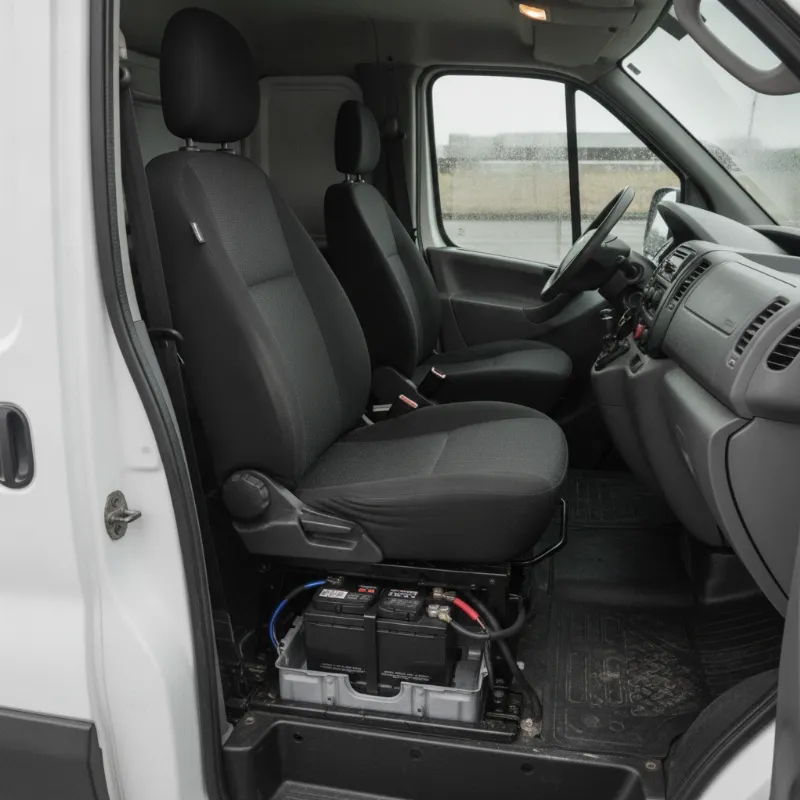
Nissan Primastar Where Is the Battery Located?
On most Nissan Primastar models, the battery is not tucked away in the engine bay like many other light commercial vehicles. Instead, Nissan positioned it beneath the driver's seat, which is a common layout on Renault-Nissan van platforms of this era (the Primastar shares much of its architecture with the Renault Trafic and Vauxhall Vivaro of the same generation). You'll find the battery sitting in a moulded plastic tray under the driver's seat base, secured with a metal clamp and connected to the vehicle's loom through the floor.
Placing the battery under the seat helps balance weight across the front axle and frees up space in the engine compartment for the turbo, intercooler pipework and diesel injection system. It also means the battery is protected from the elements, but does require you to move the seat and lift a cover to reach it — something first-time Primastar owners often find surprising.
A small number of later or facelift Primastar variants may have a secondary auxiliary battery or a jump-start terminal in the engine bay for convenience, but the main starter battery remains under the driver's seat throughout the model run.
How to Access the Nissan Primastar Battery Step by Step
Getting to the battery is straightforward once you know where to look, but a few sensible precautions will make the job quicker and safer. Because the battery lives inside the cab, you'll want the interior clean and dry before you start, and you should always disconnect the negative terminal first to avoid shorting anything against the seat frame.
Tools You'll Need Before You Start
You don't need a full workshop to service a Primastar battery, but the right tools make life much easier. Grab a 10mm and 13mm spanner or socket for the terminal clamps and hold-down bracket, a Torx or Phillips screwdriver for the seat cover fasteners (depending on trim), a torch so you can see clearly into the recess, and a pair of insulated gloves. If you're planning to replace the battery outright, have your new unit ready and a memory saver plugged into the 12V socket so you don't lose radio, ECU and window settings.
Removing the Battery Cover Safely
Start by sliding the driver's seat fully back and tilting the backrest forward to give yourself room. Depending on the year and trim, you'll either see a fabric flap secured with Velcro or a plastic cover held by two or three screws or clips at the front edge of the seat base. Undo the fasteners, lift the cover clear and set it aside. You'll now see the battery sitting in its tray with a plastic terminal shield over the positive post.
Lift or unclip the red terminal shield, then loosen the negative (black) terminal first and move the cable well clear. Only then should you loosen the positive (red) terminal. If you're removing the battery completely, undo the hold-down clamp bolt at the base and lift the battery straight up — it's heavier than it looks, so use both hands and keep it level to avoid spilling electrolyte from a flooded unit.
Nissan Primastar 1.9 dCi 100PS SE 2700 SWB Panel Van: Battery Location Notes
The 1.9 dCi 100PS SE 2700 short-wheelbase panel van follows the standard Primastar layout, with the battery mounted under the driver's seat. On this specific variant you'll typically find a 12V 70Ah unit fitted from the factory, which is more than adequate for the 1.9 litre common-rail diesel's cold-start demands. Because the SE trim often includes electric windows, central locking and a factory radio, always fit a like-for-like or higher-capacity battery to avoid nuisance electrical faults.
One thing to watch on the 1.9 dCi is the earth strap running from the battery negative to the seat mounting bolt and body — corrosion here is a common cause of hard starting and dashboard glitches. When you have the seat lifted, take a moment to inspect the terminals, clean any green oxidation with a wire brush and apply a light smear of petroleum jelly before refitting the leads.
Checking, Charging and Replacing the Primastar Battery
Once you can access the battery, testing its condition is a simple job. A healthy 12V battery should read around 12.6–12.8 volts at rest with the ignition off, and hold above 10 volts when cranking. If you're charging it in situ with a smart charger, connect the positive lead first, then the negative to a good earth point on the body rather than directly to the negative post, to protect the vehicle's electronics.
Replacement is essentially a reverse of removal. Fit the new battery, tighten the hold-down clamp, reconnect positive first and negative last, then refit the terminal shield and the seat cover. Always make sure the battery is properly secured — a loose battery in a working van will shift under braking and can damage terminals or the tray itself.
Signs Your Primastar Battery Needs Replacing
Primastar batteries generally last four to six years, but hard commercial use, short journeys and cold weather all shorten that lifespan. Tell-tale signs include slow cranking on the first turn of the day, dim headlights at idle, the stop-start system (where fitted) refusing to work, and a battery warning light flickering on the dashboard. If your radio resets after the van sits overnight, or the central locking becomes hesitant, it's usually the battery rather than the alternator — though it's worth having both tested together.
How to Enter the Radio Code on a Nissan Primastar After Battery Disconnection
Most factory-fitted Primastar radios lock themselves when the battery is disconnected and display "CODE" on the screen when power returns. To re-enter it, switch the ignition to accessory position so the radio wakes up, then use the preset buttons 1 to 4 (or the tuning knob on later units) to input each digit of your four-digit code, pressing the source or enter button to confirm. The code itself is usually printed on a card in the owner's wallet or stamped on a sticker inside the glovebox lid. If you've lost it, a Nissan dealer can retrieve it from the vehicle's VIN, though there is normally a small charge for this service.
Related Nissan Primastar Electrical Issues
Because so much of the Primastar's electrical system routes through or near the battery under the seat, a tired battery can trigger a surprising range of warning lights and gremlins. It's always worth ruling out battery condition and earth quality before chasing more expensive faults elsewhere on the loom.
Airbag Light and Service Light Warnings
A very common Primastar quirk is the airbag warning light coming on after the driver's seat has been moved or the battery disconnected. This is usually caused by the seat occupancy sensor connector being disturbed — check the yellow plug under the seat is fully clicked home. Similarly, a service light or engine management light illuminating after battery work often just needs a short reset drive cycle, though persistent lights should be scanned with a diagnostic tool to read any stored fault codes.
Looking to Upgrade? Browse Our Nissan Primastar Vans for Sale
If your current Primastar is starting to feel its age — or you simply fancy something newer with fewer electrical niggles — it's worth taking a look at what's on the used van market. The Primastar range offers a great balance of load space, fuel economy and running costs, and later models bring welcome improvements in cabin comfort and refinement. Get in touch with our sales team for current stock, honest advice on the best specification for your work, and flexible finance options tailored to sole traders, small businesses and fleet buyers alike.
FAQs
Where is the battery located on a Nissan Primastar and how do you access it?
The battery on a Nissan Primastar is located under the driver's seat, inside the cab. To access it, slide the driver's seat fully back, tilt the backrest forward and remove the plastic or fabric cover on top of the seat base (usually held by screws, clips or Velcro). Lift the terminal shield, disconnect the negative terminal first, then the positive, and undo the hold-down clamp if you need to lift the battery out.
Is there a battery in the engine bay of a Nissan Primastar?
No, the main starter battery is not in the engine bay on a Primastar. Some models have a jump-start terminal in the engine compartment for convenience when the vehicle won't start, but the battery itself sits under the driver's seat on every generation of Primastar.
What size battery does a Nissan Primastar 1.9 dCi take?
The Nissan Primastar 1.9 dCi typically uses a 12V battery rated around 70Ah with roughly 640–720 CCA, though this can vary by trim and options fitted. Always check the label on your existing battery or the owner's handbook before buying a replacement, and never fit a battery with lower capacity than the original.
Will I lose my radio code if I disconnect the Primastar battery?
Yes, most factory Primastar radios lock and demand a four-digit code when the battery is reconnected. The code is usually on a card in your service wallet or on a sticker inside the glovebox. If you've lost it, a Nissan main dealer can retrieve it using the VIN. Using a memory saver plugged into the 12V socket during battery work will avoid the lockout altogether.
Why does my airbag light come on after changing the Primastar battery?
This is very common and usually caused by the seat occupancy or airbag connector under the driver's seat being disturbed while accessing the battery. Check that the yellow plug beneath the seat is fully clicked into place. If the light stays on after that, the fault will need clearing with a diagnostic scanner.