 Call us on
Ford Sync 4
Ford Sync 4: The Ultimate Guide
As we dive into Ford Sync 4 the world of automotive technology, we can’t ignore the game-changing Ford Sync 4 system. This latest infotainment powerhouse from Ford has been causing a revolution in how we interact with our vehicles. We’ve seen a significant leap forward in features, usability, and connectivity, making our driving experience more seamless and enjoyable than ever before. See Ford Ranger MSRT
In this guide, we’ll explore what Ford Sync 4 is all about and how it stands out from its predecessor, Sync 3. We’ll take a close look at its user interface, connectivity options, and the wide range of compatible apps. We’ll also delve into its navigation capabilities, voice command features, and some hidden gems that might surprise you. By the end, you’ll have a clear picture of why Sync 4 is making waves in the automotive world and how it can enhance your time behind the wheel. See Can I Get Van Finance With An IVA
What is Ford Sync 4?
Ford Sync 4 is the latest iteration of Ford’s infotainment system, representing a significant leap forward in automotive technology. I’ve had the chance to explore this system, and I can tell you it’s a game-changer for Ford vehicles. Let’s dive into what makes Sync 4 stand out and how it’s revolutionizing the driving experience.
Evolution from previous versions
The journey of Ford Sync 4 infotainment system began back in 2007 with the first generation of SYNC. Since then, we’ve seen several iterations, each bringing improvements and new features. Now, with Sync 4, we’re witnessing a major evolution in how we interact with our vehicles.
One of the most noticeable changes in Ford Sync 4 is the screen size. For example, the new Ford Focus boasts a 13.2-inch screen, which is significantly larger than what we saw in Sync 3 1. This increase in screen real estate allows for a more immersive and user-friendly interface. See Ford Ranger Wildtrak X Lease
Key features and improvements Ford Sync 4
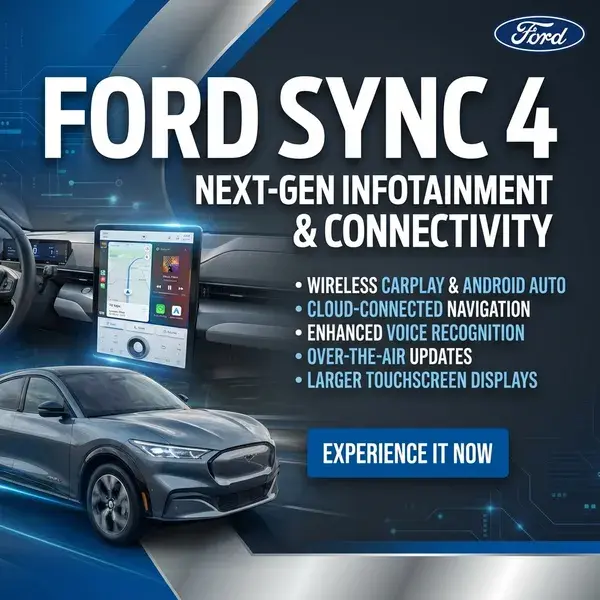
Sync 4 comes packed with features that make it a true next-gen infotainment system. Here are some of the standout improvements I’ve noticed:
- Enhanced Voice Control: The system now uses cloud-connected technology, continually updating its vocabulary. This means it’s better at understanding different accents and speech patterns, making voice commands more conversational and natural 1.
- Over-the-Air Updates: With Ford Power-Up software updates, your car can stay up-to-date automatically. No more waiting for manual updates – just set it to automatic, and you’re good to go 1.
- Wireless Connectivity: One of my favorite features is the ability to connect your Android or Apple phone to Android Auto or Apple CarPlay without any wires. It’s incredibly convenient and makes accessing your favorite apps a breeze 1.
- Digital Owner’s Manual: Say goodbye to bulky paper manuals. Sync 4 includes an easy-to-use visual guide to your car right on the touchscreen 1.
- Cloud-Based Navigation: The system offers real-time traffic and weather data, allowing for more efficient route planning. For electric vehicles, it even considers your battery status and suggests convenient charging stops 2.
- Customizable Interface: The new “skin” of the system looks sleek and modern, and it’s more customizable than ever before 3.
Compatible Ford models Ford Sync 4
As of now, Sync 4 is available on select Ford models, with more to come in the future. Here’s a list of vehicles that currently have or will soon have Sync 4:
It’s worth noting that Ford is gradually rolling out Ford Sync 4 to its vehicle lineup as models undergo major redesigns. We can expect more vehicles to feature this advanced system in the coming years 3. See Which T5 Engines To Avoid
I have to mention that if you currently have a vehicle with Sync 3, it’s not possible to upgrade to Sync 4. The hardware is different, and the software isn’t backward-compatible. To experience Sync 4, you’ll need to upgrade to a newer Ford model that comes equipped with the system 3.
In conclusion, Ford Sync 4 represents a significant step forward in automotive infotainment technology. With its enhanced features, improved user interface, and seamless connectivity options, it’s clear that Ford is committed to providing a cutting-edge driving experience. As more vehicles adopt this system, we can look forward to even more innovations in the future. See MSRT Transit Graphics
User Interface and Connectivity
When it comes to the user interface and connectivity features of Ford Sync 4, I’ve found that it’s a significant step up from its predecessor. Let’s dive into the details that make this system stand out. See VW Transporter Sportline 2023
Touchscreen display sizes Ford Sync 4
One of the most noticeable improvements in Ford Sync 4 is the variety of screen sizes available. Ford has tailored the system to run on displays ranging from 8 inches to an impressive 15.5 inches 4. This flexibility allows for a more immersive and user-friendly experience across different vehicle models.
In my experience, the larger screens really shine when it comes to multitasking. On the 12-inch screens, for instance, you can split the display into larger and smaller windows. This means you can keep your navigation route visible while changing songs or adjusting other settings 4. It’s a game-changer for those of us who like to stay on top of multiple tasks while driving.
The 15.5-inch screens take things a step further with Adaptive Dash Cards. These cards appear horizontally at the bottom of the screen, showing recently used or popular features. What I love about this is that you can interact with these cards directly – pausing music or hanging up calls without having to navigate through menus 4.
Wireless smartphone integration
One of the standout features of Ford Sync 4 is its wireless connectivity options. For the first time, Ford has implemented wireless Apple CarPlay and Android Auto 4. This means you can leave your charging cables at home and still enjoy seamless integration with your smartphone.
I’ve found this feature particularly convenient during short trips when I don’t want to bother plugging in my phone. The system also supports wireless charging for compatible devices, which is a nice touch 4. See VW Van Centre Leeds
Another great aspect is the ability to use both Bluetooth and Wi-Fi simultaneously. This allows for in-vehicle entertainment and mobile device navigation to operate at the same time, giving you more control over your connected experience 4.
Voice control advancements
The voice control capabilities of Sync 4 have taken a significant leap forward. The system now uses cloud-based voice processing, which allows for more natural, conversational requests 4. For example, you can ask, “Find me the best Thai restaurant,” and the system will offer data-based suggestions.
What I find particularly useful is the ability to communicate via SMS and email using natural speech recognition 4. It’s much safer and more convenient than trying to type while driving.
Ford has also introduced a “wake word” feature. By enabling this in the settings, you can activate the voice control system simply by saying “OK Ford” 5. This hands-free approach makes it even easier to control various aspects of your vehicle, from adjusting the temperature to making calls or searching for directions 5.
The system’s AI is designed to learn your preferences over time, making its responses more tailored to your needs 6. I’ve noticed that the more I use it, the better it becomes at understanding my specific requests and speech patterns.
In conclusion, the user interface and connectivity features of Ford Sync 4 represent a significant improvement over previous versions. With its larger, more versatile screens, wireless smartphone integration, and advanced voice control capabilities, it’s clear that Ford has put a lot of thought into creating a more intuitive and user-friendly infotainment experience. As someone who uses this system regularly, I can say that these improvements have made a noticeable difference in my daily driving experience.
Navigation and Infotainment
When it comes to navigation and infotainment, Ford Sync 4 really shines. I’ve found that this system offers a seamless and intuitive experience that makes driving more enjoyable and less stressful.
Cloud-connected navigation Ford Sync 4
One of the standout features of Ford Sync 4 is its cloud-connected navigation system. This technology has changed the game when it comes to in-car navigation. The system uses real-time data to provide up-to-date information about your route, making your journey smoother and more efficient.
What I love about this feature is how it integrates with the voice command system. You can use natural language to ask for directions, and the system understands conversational requests. For example, you can say something like, “Find me the best Thai restaurant,” and Sync 4 will offer data-based suggestions 6. This makes it much easier to find what you’re looking for without taking your hands off the wheel.
Ford offers two different navigation options with Sync 4. There’s Connected Navigation, which comes with a 90-day trial on models like the F-150 and Bronco. Then there’s the optional Connected Built-in Navigation system, which offers three years of complimentary service and is available on the F-150, Bronco, and comes standard on the Mach-E 6.
Real-time traffic and weather updates
Another feature that I find incredibly useful is the real-time traffic and weather updates. Sync 4 uses its cloud connectivity to keep you informed about the latest traffic conditions, construction zones, and even parking availability 6. For electric vehicle owners, it even provides information about plug-in locations, which is super handy.
The Live Traffic feature is particularly impressive. It provides routes to destinations using real-time traffic information, helping you avoid congestion and arrive at your destination more quickly 7. You can easily turn this feature on or off in your Sync settings menu, giving you control over when and how you use it.
I’ve noticed that the system covers all major and minor roads, delivering real-time traffic updates that dynamically reroute you to avoid hold-ups 8. This has saved me from countless traffic jams and made my commutes much more predictable.
As for weather updates, Sync 4 keeps you informed about current conditions and forecasts. You can access this information by pressing the tools button when the map is displayed and selecting weather, or by using voice commands to ask for weather information 9.
Multimedia streaming capabilities
Sync 4 doesn’t just excel at navigation; it’s also a powerhouse when it comes to entertainment. The system offers seamless access to popular news and entertainment platforms right on your in-dash screen 10. This means you can enjoy your favorite content without having to fiddle with your phone while driving.
One of the features I’m most excited about is Ford Premium Connectivity. This service offers the most seamless video streaming experience, without having to worry about finding a local connection or dealing with weak Wi-Fi 10. It’s worth noting that this is a separate service that you’ll need to activate, but in my experience, it’s well worth it for the convenience it provides.
The system is also compatible with Apple CarPlay and Android Auto, allowing you to wirelessly connect and control your mobile screens from your center screen display 6. This means you can easily access your favorite music streaming apps, podcasts, and more, all through the Sync 4 interface.
In conclusion, the navigation and infotainment hidden features of Ford Sync 4 represent a significant step forward in automotive technology. From its cloud-connected navigation and real-time updates to its robust multimedia capabilities, Sync 4 offers a comprehensive and user-friendly experience that enhances every aspect of your drive.
Conclusion Ford Sync 4
Ford Sync 4 has a significant impact on the driving experience, offering a blend of cutting-edge technology and user-friendly features. Its cloud-connected navigation, real-time updates, and wireless connectivity options make it a standout in the automotive infotainment world. The system’s ability to learn and adapt to user preferences, coupled with its advanced voice control capabilities, sets a new standard for in-car technology.
To wrap up, Ford Sync 4 represents a major step forward in how we interact with our vehicles. Its large, customizable displays and seamless smartphone integration make it a joy to use on a daily basis. As Ford continues to roll out this system across its vehicle lineup, it’s clear that Sync 4 will play a crucial role in shaping the future of automotive technology.
FAQs Ford Sync 4
What applications can I use with Ford SYNC 4?
Ford SYNC 4 supports a variety of applications through SYNC AppLink, including Tidal Music, Ford + Alexa (currently not available in Canada), iHeartRadio, Slacker Radio, Pandora, and Waze for navigation and live travel updates.
Is screen mirroring possible on Ford SYNC 4?
Yes, Ford SYNC 4 includes a screen mirroring feature that allows you to project the screen of your phone or tablet onto the vehicle’s dashboard, effectively using it as a secondary monitor.
Does Ford SYNC 4 offer Wi-Fi connectivity?
Yes, Ford SYNC 4 allows you to connect to Wi-Fi networks. Once you set up a network, your vehicle will automatically connect to it whenever it’s within range. To connect, simply press the Settings button on your SYNC screen and follow the prompts to add a Wi-Fi network.
How effective is the SYNC 4 system in Ford vehicles?
The SYNC 4 system is highly regarded for its advanced voice recognition technology, which can understand and process natural language. This feature makes it easier to interact with the system as if you were speaking to another person.
References
[1] – https://www.buckinghamford.co.uk/knowledge-center/what-is-ford-sync-4/
[2] – https://www.ford.co.uk/technology/connectivity/sync-4
[3] – https://www.cjponyparts.com/resources/sync-3-vs-sync-4?srsltid=AfmBOopmx9Yj39R0J2pz4W5Cne6HG-fCzHhs2LngmdS9LSAE7HXILuds
[4] – https://media.ford.com/content/fordmedia/fna/us/en/news/2019/10/30/ford-sync-4-brings-new-levels-of-connectivity.html
[5] – https://www.youtube.com/watch?v=UZ0sl57pJ9Y
[6] – https://www.ford.com/technology/sync/sync-4/image/sync4-homepage-image-ffd1fa247fc3c8faa6f83d8d20de36d8-ai/
[7] – https://www.ford.com/support/how-tos/sync/sync-4/how-do-i-switch-live-traffic-on-and-off/
[8] – https://www.ford.co.uk/help/your-vehicle/how-to-videos/use-live-traffic-with-fordpass-connect
[9] – https://www.macheforum.com/site/threads/doppler-type-weather-display-in-sync4a.1820/page-2
[10] – https://www.ford.com/support/how-tos/ford-technology/ford-connected-services/ford-video-streaming-faqs/