Peugeot Expert: How to Change the Display from KM to Miles
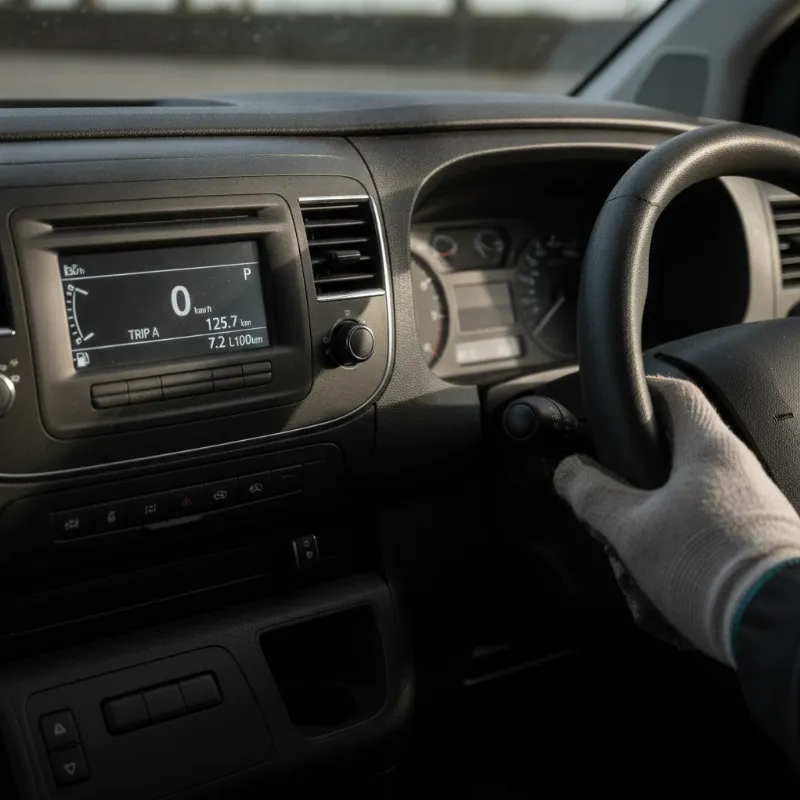
Why Switch Your Peugeot Expert Display from Kilometres to Miles?
If you've recently taken delivery of a Peugeot Expert and the speedometer or trip computer is showing kilometres instead of miles, you're not alone. Many Peugeot Expert vans sold in the UK originate from European stock, and it's common for the display units to be set to metric by default. While the speedometer dial itself is typically marked in both mph and km/h, the digital readouts on the driver information display — including your trip distance, average speed, and range to empty — may still be showing kilometres.
Switching the display to miles isn't just about personal preference. On UK roads, speed limits, road signs and navigation prompts are all in miles and miles per hour, so having your trip computer aligned with the local system makes journey planning far easier. Fuel economy figures will also make more sense when displayed in miles per gallon rather than litres per 100 kilometres, helping you keep a closer eye on running costs.
The good news is that changing the setting is a quick job you can do yourself from the driver's seat — no trip to a Peugeot dealer or diagnostic equipment required. The exact process depends on which generation of Expert you have, so it's worth identifying your model year before you start.
Where to Find the Unit Setting on a Peugeot Expert
Peugeot has used a couple of different instrument cluster designs across the various generations of the Expert, so the location of the units menu varies. Before you dive in, take a moment to familiarise yourself with the controls around the steering wheel and the layout of your dashboard display.
Locating the Trip Computer Stalk
On most Peugeot Expert vans, the trip computer is controlled by a small stalk mounted on the steering column, typically below the indicator stalk on the left-hand side. This stalk usually has a rotating end or a push button at the tip that lets you cycle through the trip computer menus — things like trip A, trip B, average speed, average consumption and range.
Pressing and holding the button at the end of the stalk is often the key to accessing hidden settings menus, including the units of measurement. On some models, you may need to use the steering wheel-mounted buttons instead, particularly on higher-spec trims or later models with a more integrated infotainment system.
Identifying Your Instrument Cluster Type
There are two main types of instrument cluster you're likely to encounter in a Peugeot Expert. The older second-generation Expert (built up to around 2016) uses a more traditional analogue dial layout with a small monochrome LCD display in the middle. The third-generation Expert, launched in 2016 and still in production, features a more modern cluster paired with a central touchscreen infotainment system, and this is where many of the vehicle settings — including units — are managed.
If your Expert has a colour touchscreen in the centre console, you're almost certainly working with the newer system. If your dashboard is more utilitarian with a smaller central display and physical buttons, you have the older setup.
Step-by-Step: Changing km to Miles on a Peugeot Expert
Once you've identified which generation of Expert you're driving, follow the appropriate steps below. It's best to do this with the ignition on but the engine off, and with the vehicle parked safely.
Older Peugeot Expert Vans (Pre-2016)
For the second-generation Expert, start by turning the ignition to the accessory position so the dashboard lights up. Locate the trip computer stalk on the steering column and press and hold the button at the end of the stalk for around five to ten seconds. The display should switch into a settings mode, allowing you to scroll through options such as language, units of distance, units of temperature and units of fuel consumption.
Rotate or press the stalk to cycle to the distance units option, then confirm your selection to switch from kilometres to miles. Continue through the menu to change fuel consumption from litres per 100 km to miles per gallon if you'd like a fully imperial display. Once you're happy, a final long press should exit the menu and save your settings. Turn the ignition off and back on to confirm everything has stuck.
New Peugeot Expert Van (2016 Onwards) Touchscreen Menu
On the current third-generation Expert, the units are controlled through the central touchscreen rather than the instrument cluster. With the ignition on, tap the main menu or settings icon on the touchscreen. Navigate to the "Driving/Vehicle" or "Configuration" menu, then look for a "Units" or "Unit of Measurement" option.
You'll be able to select miles for distance and speed, miles per gallon for fuel consumption, and Fahrenheit or Celsius for temperature depending on your preference. Confirm your changes and back out of the menu — the instrument cluster and any digital speedometer readouts should update immediately. Some owners also find that pairing this with a quick language or region check ensures everything stays in imperial units after the next start-up.
Troubleshooting: What to Do If the Setting Won't Change
Occasionally, drivers find that the units menu is greyed out, the setting reverts to kilometres after an ignition cycle, or the option simply isn't there. The most common cause is that the vehicle needs to be stationary with the handbrake applied and the ignition on but engine off — try that first if the menu won't respond.
If the setting refuses to save between journeys, it can point to a software glitch in the infotainment or body control module. Disconnecting the battery for around ten minutes and reconnecting it will sometimes reset the system and allow the change to take. If that doesn't work, a Peugeot dealer or independent specialist can update the units via diagnostic software — a quick job that's often carried out under warranty on newer vans.
It's also worth double-checking the analogue speedometer face. UK-market Peugeot Experts should have mph as the primary scale, but grey imports and some ex-lease European vehicles may have km/h as the main scale with mph in a smaller inner ring. In that case, switching the digital display alone won't be enough — you'd need a replacement instrument cluster to fully convert the van, which is worth factoring in when buying used.
Thinking of Upgrading? Explore Our Peugeot Expert Range
If you've been wrestling with a European-spec dashboard and fancy a fresh start, it might be time to consider a UK-supplied Peugeot Expert that's ready to go from day one. The current Expert is one of the most capable medium panel vans on the market, offering multiple body lengths, competitive payloads, a refined driving experience and an increasingly strong all-electric variant in the e-Expert.
Whether you're looking for a compact Standard-length van for city work, a Long wheelbase for extra load volume, or a crew cab for team transport, our stock covers a wide range of trims, engines and configurations. Every van we sell is set up for UK roads — miles, mph and all — with a full handover so you can drive away with confidence. Get in touch with our sales team to arrange a viewing or a test drive, and see how a new or nearly-new Peugeot Expert could work harder for your business.
FAQs
How do I change the dashboard display on a Peugeot Expert van from kilometres to miles?
On pre-2016 Peugeot Expert vans, turn the ignition on, then press and hold the button at the end of the trip computer stalk (on the steering column) for around five to ten seconds until the settings menu appears. Scroll to the distance units option and switch from km to miles. On 2016-onwards models, use the central touchscreen: go to Settings, then Driving/Vehicle or Configuration, select Units, and change distance from kilometres to miles. Confirm the change and the display will update straight away.
Will changing the display to miles also change the speedometer reading?
On UK-supplied Peugeot Experts, the analogue speedometer is marked in mph as the main scale and won't be affected — only the digital readouts (trip distance, average speed, range) switch. On imported European vans where the dial shows km/h as the primary scale, changing the setting only updates the digital display, and you'd need a UK-spec instrument cluster to fully convert the speedometer.
Why does my Peugeot Expert keep resetting to kilometres after I switch it off?
If the setting doesn't save between journeys, it usually points to a software glitch. Try disconnecting the battery for around ten minutes to reset the system, then set the units again. If it still reverts, a Peugeot dealer or independent specialist can force the change through diagnostic equipment — often a quick job and frequently covered under warranty on newer vans.
Can I change the fuel consumption units from litres per 100 km to mpg at the same time?
Yes. When you access the units menu — either via the trip computer stalk on older Experts or the touchscreen on newer ones — you'll usually see separate options for distance, fuel consumption and temperature. Set fuel consumption to miles per gallon (mpg) so your economy figures line up with what UK drivers are used to seeing.