How to Change the Time on a VW Crafter: Step-by-Step Guide
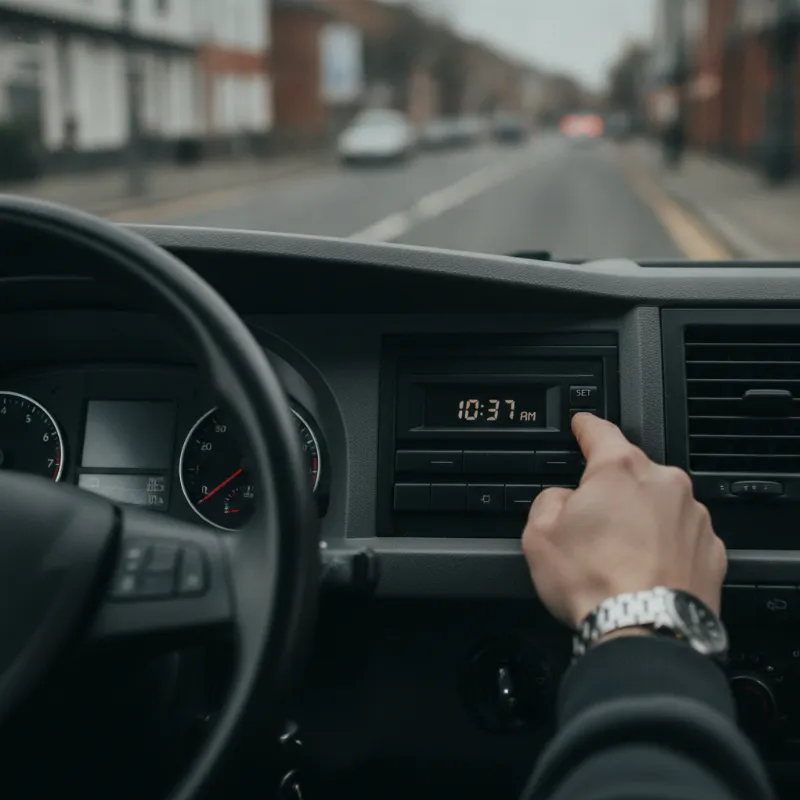
How to change the time on a VW Crafter dashboard clock
Changing the clock on a Volkswagen Crafter is one of those small jobs that trips up plenty of drivers, especially after the twice-yearly change between British Summer Time and GMT, or after a battery disconnect. The good news is that it's a straightforward process on every generation of the Crafter — the exact method just depends on the age of your van and whether it's fitted with the original analogue-style dash cluster or the newer digital driver display and infotainment setup.
Before you start, park up safely with the handbrake on and the ignition switched to position one (accessories on) or with the engine running. Trying to adjust the clock with the ignition completely off will usually do nothing, as the instrument cluster needs to be live to accept the change.
Older VW Crafter models (2006–2016)
On first-generation Crafters — the shared platform with the Mercedes Sprinter — the clock is displayed in the small mono screen between the speedometer and rev counter. To change it, look for the two small buttons on the instrument cluster itself, usually marked with a clock symbol and a reset (0.0) symbol, or accessible via the stalk on the right of the steering column.
Press and hold the clock button (often labelled with a small clock icon or "h/min") for a few seconds until the hours digits begin to flash. Use the trip reset button or the up/down toggle on the wiper stalk to scroll the hours forward. Once the correct hour is showing, press the clock button again to move onto the minutes, and repeat the process. A final press confirms the setting and the digits will stop flashing. If your Crafter is fitted with the optional radio-based clock display, you may need to set it separately through the head unit menu.
Newer VW Crafter models (2017 onwards)
The second-generation Crafter, launched in 2017 and built at Volkswagen's Września plant in Poland, uses a much more modern digital driver display and integrates the clock more tightly with the MIB infotainment system. On these vans, the clock shown in the instrument cluster is usually driven by the time set in the infotainment head unit, so you'll rarely change it from the dashboard directly.
If your Crafter has the analogue-look digital cluster, press the "View" or "OK" button on the multifunction steering wheel to bring up the settings menu, scroll to "Time and Date" and adjust using the thumbwheel or arrow keys. On models with the fully digital Discover Media or Composition display, the clock is set through the infotainment touchscreen as described below, and the dashboard will update automatically.
Adjusting the clock via the infotainment system
For Crafters fitted with Volkswagen's Composition Audio, Composition Media or Discover Media infotainment systems, the clock is buried in the general settings menu but only takes a minute to find. With the ignition on, press the "Menu" or home button on the head unit, then tap "Setup" or the cog icon on the touchscreen. Scroll down to "Time and Date" — you'll usually see options for time source, time format (12 or 24 hour), time zone and daylight saving.
Most owners find it easiest to set the time source to "GPS" and switch daylight saving to "Automatic". This way, the van picks up the correct time from the satellite signal whenever it has a clear view of the sky, and adjusts itself in March and October without any input from you. If you'd rather set it manually, choose "Manual" as the time source and tap the hours and minutes to nudge them up or down. Confirm with "Back" or the tick icon and the new time will show across the dashboard, infotainment screen and any connected trip computer.
Troubleshooting: clock keeps resetting or won't change
If your Crafter's clock refuses to hold the correct time, drifts by several minutes a week, or resets to midnight every time you start the van, there's usually a simple underlying cause. The most common culprit is a weak or failing battery — when voltage drops overnight, the infotainment system loses its stored settings and reverts to a default time on the next start-up. This is particularly common on high-mileage panel vans that spend nights parked up with tail-lift or fridge loads running.
Battery, fuse and GPS sync issues
Start by having the starter battery load-tested at your local garage or parts factor — a healthy Crafter battery should sit around 12.6 to 12.8 volts at rest. If the battery is fine, check the fuses for the infotainment head unit and instrument cluster (your owner's handbook lists the exact locations under the steering column and in the engine bay fuse box). A blown or intermittent fuse can cause the clock to lose power without affecting other functions.
If you're relying on GPS sync and the clock is stuck an hour out, it's almost always the daylight saving setting rather than a fault. Double-check that "Auto DST" is enabled and that the time zone is set to "UTC+0 London" rather than a neighbouring zone. On vans that spend a lot of time in underground car parks, warehouses or heavily built-up areas, the satellite signal can struggle — parking outside for ten minutes with the ignition on usually lets the system re-sync and correct itself.
Other quick VW Crafter cab tips for owners and fitters
While you've got the ignition on and the infotainment menus open, it's worth taking a moment to check a few other easily overlooked settings. Set the date correctly so that service reminders and any connected fleet telematics log the right timestamps. Check that the units (miles, mpg, Celsius) match your preferences, and review the driver assistance settings if the van has been serviced or had a battery disconnect recently — some features like lane assist and speed limiter defaults can revert.
For fitters and workshops handing vans back to customers, always reset the clock and date after any job that involves disconnecting the battery, including windscreen replacements, alarm installs and infotainment upgrades. It's a small courtesy that saves the driver a phone call later. And if you're converting a Crafter for camper, welfare or Luton use, remember that aftermarket leisure batteries and split-charge systems can occasionally interfere with the main battery's voltage stability — the clock resetting is often the first sign that something in the auxiliary wiring needs a second look.
FAQs
How do you change the time (clock) on a VW Crafter?
On older Crafters (2006–2016), press and hold the clock button on the instrument cluster or right-hand stalk until the hours flash, then use the trip reset or toggle to scroll to the correct time, pressing again to confirm minutes. On newer Crafters (2017 onwards), go to the infotainment touchscreen, tap Setup or the cog icon, choose Time and Date, and either set the time manually or select GPS as the time source with automatic daylight saving enabled.
Why does my VW Crafter clock keep resetting to 12:00?
A clock that resets to midnight every time you start the van almost always points to a weak starter battery losing voltage overnight, or a loose battery terminal. Have the battery load-tested first. If the battery is healthy, check the fuses for the infotainment head unit and instrument cluster, as an intermittent fuse can also cause the clock to lose stored settings.
Does the VW Crafter clock change automatically for British Summer Time?
Yes, on 2017-onwards Crafters with GPS time sync and automatic daylight saving switched on in the infotainment settings, the clock will change itself in March and October. Older Crafters and any van set to manual time source will need to be adjusted by hand twice a year.
Can I change the VW Crafter clock without turning on the engine?
You don't need to run the engine, but the ignition must be switched on to at least position one (accessories) so that the instrument cluster and infotainment system are live. With the ignition fully off, button presses and touchscreen inputs won't be registered.
How do I switch the VW Crafter clock between 12-hour and 24-hour format?
Go into the infotainment Setup menu, select Time and Date, and look for the Time Format option — you can toggle between 12-hour (AM/PM) and 24-hour display. The change applies to both the head unit and the digital instrument cluster.